
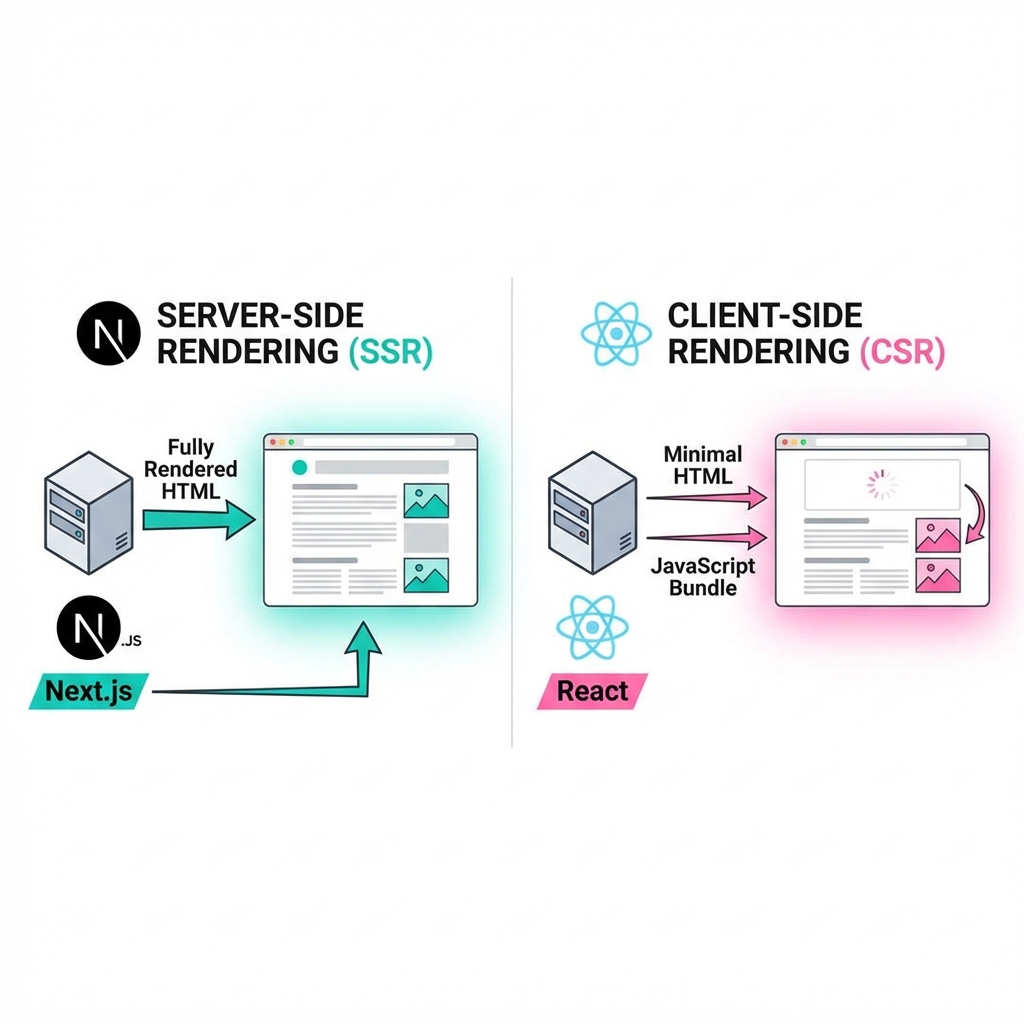
SSR vs CSR: Understanding Rendering Methods
How should web pages be rendered? The answer lies in SSR (Server-Side Rendering) and CSR (Client-Side Rendering).
What is Rendering?
Rendering is the process of browsers drawing HTML, CSS, and JavaScript on screen. The key difference is whether this happens on the server or client (browser).
CSR (Client-Side Rendering)
How It Works
- Server sends nearly empty HTML
- Browser downloads JavaScript
- JavaScript creates DOM and renders
<!-- HTML sent from server (almost empty) -->
<!DOCTYPE html>
<html>
  <head><title>My App</title></head>
  <body>
    <div id="root"></div>
    <script src="/bundle.js"></script>
  </body>
</html>
// React (CSR)
function App() {
  const [data, setData] = useState(null);

  useEffect(() => {
    fetch('/api/products')
      .then(res => res.json())
      .then(setData);
  }, []);

  if (!data) return <div>Loading...</div>;

  return <div>{data.map(product => <ProductCard key={product.id} product={product} />)}</div>;
}

ReactDOM.render(<App />, document.getElementById('root'));
CSR Advantages
- Fast page transitions: Instant navigation after initial load
- Rich interactions: Easy SPA implementation
- Reduced server load: Client handles rendering
CSR Disadvantages
- Slow initial load: Requires JavaScript download and execution
- Poor SEO: Search engines see empty HTML
- Performance issues: Slow on low-end devices
SSR (Server-Side Rendering)
How It Works
- Server generates complete HTML
- Browser immediately displays screen
- JavaScript activates interactions (Hydration)
// Next.js (SSR)
export async function getServerSideProps() {
  const res = await fetch('http://api.example.com/products');
  const products = await res.json();

  return {
    props: { products }
  };
}

function ProductsPage({ products }) {
  return (
    <div>
      {products.map(product => (
        <ProductCard key={product.id} product={product} />
      ))}
    </div>
  );
}
SSR Advantages
- Fast initial load: Displays complete HTML immediately
- SEO optimized: Search engines crawl complete content
- Low-end device friendly: Server handles rendering
SSR Disadvantages
- Increased server load: Rendering needed for every request
- Slower page transitions: Server request needed each time
- Complex caching: Difficult to cache dynamic content
React vs Next.js
React (CSR Framework)
- Pure CSR
- Client routing (React Router)
- Difficult SEO
Use Cases:
- Dashboards, admin pages
- Internal tools requiring login
- Real-time chat, collaboration tools
Next.js (SSR/SSG Framework)
- Supports SSR, SSG, ISR
- File-based routing
- Automatic code splitting
- Built-in API Routes
Use Cases:
- Blogs, news sites
- E-commerce
- Marketing landing pages
- Portfolios
Next.js Rendering Options
1. SSR (Server-Side Rendering)
export async function getServerSideProps(context) {
  const res = await fetch(`https://api.example.com/data`);
  const data = await res.json();

  return { props: { data } };
}
When to use:
- Real-time data (stocks, weather)
- User-specific content
- Frequently changing data
2. SSG (Static Site Generation)
export async function getStaticProps() {
  const res = await fetch('https://api.example.com/posts');
  const posts = await res.json();

  return {
    props: { posts },
    revalidate: 60  // ISR: Regenerate every 60 seconds
  };
}
When to use:
- Blog posts
- Documentation sites
- Product catalogs
3. CSR (Client-Side Rendering)
function Dashboard() {
  const [data, setData] = useState(null);

  useEffect(() => {
    fetch('/api/user-data')
      .then(res => res.json())
      .then(setData);
  }, []);

  return <div>{data ? <UserDashboard data={data} /> : 'Loading...'}</div>;
}
When to use:
- Pages after login
- Personal dashboards
- Pages where SEO isn't needed
Performance Comparison
CSR (React):
Server request → Empty HTML → JS download → JS execution → API call → Rendering
Total time: 3-5 seconds

SSR (Next.js):
Server request → Complete HTML → Immediate display → JS download → Hydration
Total time: 1-2 seconds (display at 0.5 seconds)
Hybrid Approach
Next.js allows different rendering methods per page.
my-ecommerce/
├── pages/
│   ├── index.js              # SSG (Homepage)
│   ├── products/
│   │   └── [id].js           # SSG + ISR (Product detail)
│   ├── cart.js               # CSR (Shopping cart)
│   ├── checkout.js           # SSR (Checkout)
│   └── dashboard/
│       └── orders.js         # CSR (Order history)
Selection Guide
| Criteria | React (CSR) | Next.js (SSR/SSG) |
|---|---|---|
| SEO Importance | Low | High |
| Initial Load Speed | Slow | Fast |
| Page Transitions | Very Fast | Fast |
| Server Cost | Low | High |
| Development Complexity | Low | Medium |
| Use Cases | Internal tools, SaaS | Marketing, E-commerce |
Choose React when:
- Login-required applications
- SEO isn't important
- Heavy real-time interactions
Choose Next.js when:
- SEO is important
- Fast initial load needed
- Lots of static content
There's no single answer. Choose based on project requirements, but in most cases Next.js is the better choice. Next.js supports SSR, SSG, and CSR, allowing flexible responses.